

What Is WordPress SEO? A Beginner’s Guide to Better Rankings
 You publish a helpful WordPress post.Then nothing happens.No clicks arrive. No readers find it.
Google barely notices it.That problem is common. It is also fixable.
WordPress SEO helps search engines understand your website. It also helps people discover your pages.
You do not need advanced coding skills.You need a clear process and consistent habits.This guide explains every important step. You will learn the basics without confusing technical language.
What Is WordPress SEO?
WordPress SEO is the process of optimizing a WordPress website for search engines.
The goal is better visibility in search results.It covers your content, website structure, speed, links, and technical settings.
Each part helps search engines understand your pages.
Google uses automated crawlers to discover and process web pages—clear structure, crawlable links, and useful content support that process.
WordPress already includes several search-friendly features.
These include editable permalinks and organized content types.
However, default settings cannot complete every optimization task. A successful WordPress SEO strategy focuses on people first. Search engines should come second.
Why Is WordPress SEO Important?
- Search traffic can bring visitors for months.
- Paid advertisements stop when your budget ends. Useful pages can keep attracting readers.
- Good optimization also improves the visitor experience.
- Pages load faster, look clearer, and are easier to navigate.
It can help you:
- Reach people searching for your services.
- Increase relevant organic traffic.
- Build trust around your brand.
- Generate leads without paying per click.
- Improve navigation across your website.
However, optimization never guarantees first place.Google clearly states that no method guarantees top rankings. Results also need time.
How Search Engines Understand a WordPress Website? Search engines usually follow three basic stages.
1. Crawling
A crawler discovers pages through links and sitemaps.Internal links help crawlers move through your website. External links can also introduce new pages.
2. Indexing
The search engine analyzes each discovered page.It reviews text, headings, images, titles, and other signals. Then it may store the page.
3. Ranking
The search engine compares indexed pages for each query.It aims to show useful, relevant results. Many factors can influence the final order. Your optimization work supports all three stages.
It removes confusion and improves page quality.
The Main Types of WordPress SEO.You can divide optimization into four simple areas.
4. On-Page SEO
On-page work happens inside individual pages.
It includes:
- Search intent
- Helpful content
- Page titles
- Meta descriptions
- Headings
- Image alt text
- Internal links
- Clear URLs
Every page should answer one main search need.
5. Technical SEO
Technical work improves crawling, indexing, and performance.
It includes:
- XML sitemaps
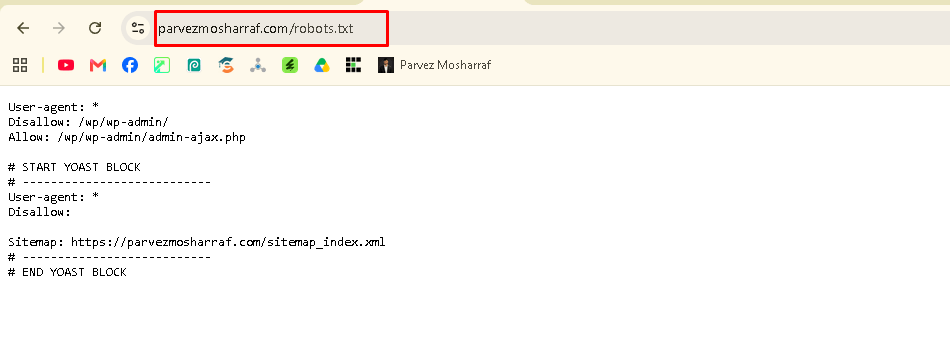
- Robots settings
- Canonical URLs
- Mobile usability
- HTTPS security
- Broken link fixes
- Page speed
- Structured data
Robots.txt
6.Off-Page SEO
Off-page work happens beyond your website.It includes backlinks, brand mentions, reviews, and digital public relations.
Relevant links can increase discovery and credibility.Avoid buying spammy link packages.
7. Local SEO
Local optimization helps nearby customers find your business.It includes location pages, local keywords, reviews, and business information.
This area matters for clinics, agencies, restaurants, and service businesses.
How to Set Up WordPress SEO Step by Step
Follow these steps in order:
Complete the basics before chasing advanced tactics.
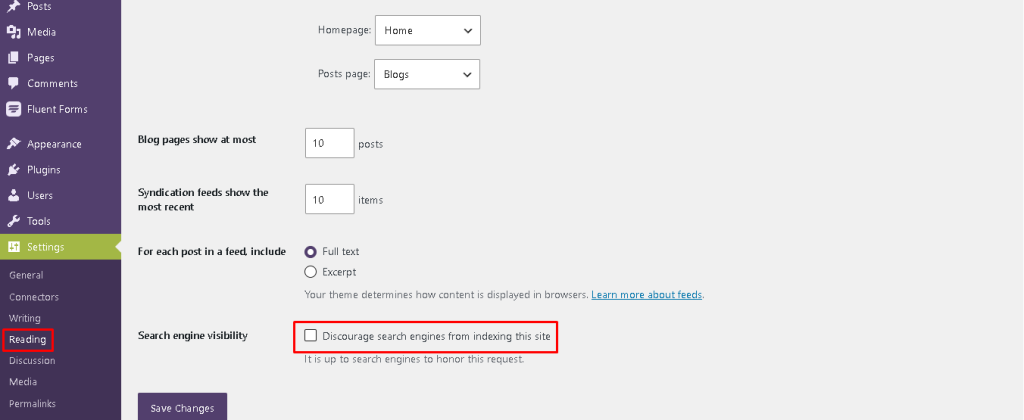
Step 1: Make Sure Search Engines Can Index Your Site. Open your WordPress dashboard.
- Go to ->Settings > Reading.
- Find ->Discourage search engines from indexing this site.
- Keep that box unchecked on a live website.
- A checked box can signal to search engines that a page should not be indexed. WordPress Site Health can also flag this setting.
- Visual placement: Add a screenshot of the Reading Settings page.
Step 2: Choose a Clean Permalink Structure
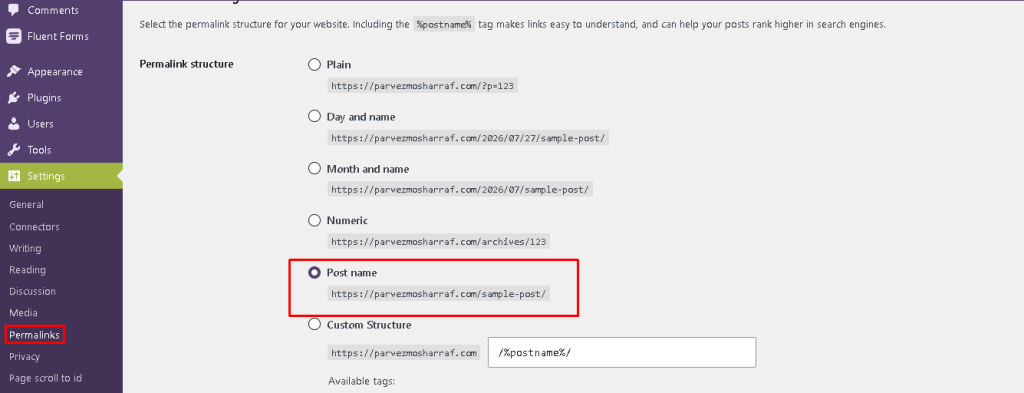
- Go to ->Settings > Permalinks.
- Choose (Post name) for most standard websites.
- A clean URL looks like this:
- `example.com/wordpress-seo-guide/`
- Avoid long URLs with dates, numbers, or unnecessary words.
- Descriptive URLs help users understand a page’s topic. They can also support clearer search snippets.
- Visual placement: Show the Post name option selected.
Step 3: Install One Reliable SEO Plugin
- Choose one established plugin.Popular choices include Yoast SEO, Rank Math, and All in One SEO.
- Do not activate multiple SEO plugins at once.They may create duplicate settings or conflicting tags.
Use the plugin to manage:
- SEO titles
- Meta descriptions
- XML sitemaps
- Canonical tags
- Basic schema settings
- Indexing controls
The plugin is only a tool.It cannot replace useful content.
Step 4: Research One Main Keyword
- Choose one main query for each page.
- Your keyword should match the reader’s goal.
For example, someone searching “What is WordPress SEO?” wants a simple explanation.
They do not want an advanced server checklist.Study related questions and longer phrases.
Then group similar ideas into a single complete article.Avoid forcing the keyword into every paragraph.
Natural language improves readability.
Step 5: Write a Clear SEO Title
Place the primary topic near the beginning.Keep the title specific and helpful.
Good example
- What Is WordPress SEO? A Simple Beginner’s Guide.
Weak example
- The Ultimate Amazing SEO Secrets You Must Know Today.
- Google recommends unique, concise, and descriptive page titles.
- Repeating keywords adds little value.
- Step 6: Create a Helpful Meta Description
- Summarize the page in one or two sentences.Include the main topic naturally. Add a clear benefit.
Example meta description
Learn what WordPress SEO means and follow simple steps to improve rankings, traffic, speed, content, and website visibility.
Google may use page content instead.Still, a unique description can support stronger clicks.
Step 7: Organize Headings Properly
- Use one H1 for the main page title.
- Use H2 headings for major sections.
- Use H3 headings for supporting points.
- Use H4 headings only when deeper detail is necessary.
- Headings should describe the next section.
- Do not use them only for visual styling.
Step 8: Improve Content Quality
- Write for a real reader.
- Answer the main question early.
- Remove filler and repeated ideas.
Use:
- Short paragraphs
- Practical examples
- Simple definitions
- Original experience
- Clear steps
- Updated information
Google encourages helpful, reliable, people-first content.
Content written only for ranking can disappoint users.
Strong WordPress SEO content solves the reader’s problem completely.
Step 9: Add Internal Links
Link to useful pages on your website.
For example, this article could link to guides about:
- Keyword research
- Image optimization
- Website speed
- Google Search Console
- WordPress security
Use descriptive anchor text.
Avoid vague phrases like “click here.”
Crawlable internal links help users and search engines discover related pages.
Step 10: Optimize Images
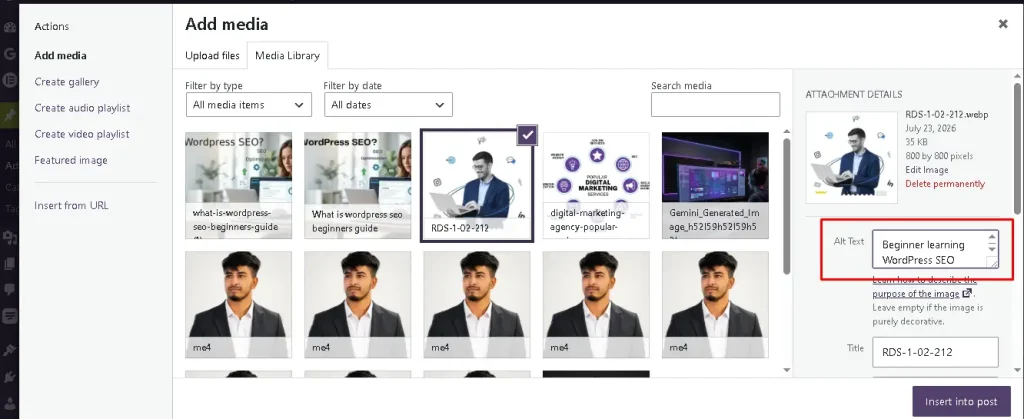
- Compress every image before uploading.Use modern formats like WebP when suitable.Rename files clearly:`wordpress-seo-settings.webp`
- Add accurate alt text:Must have to use main keyword with a short seo title inside alt txt box
- WordPress permalink settings showing the Post name option
- Do not stuff keywords into every alt field.
- Place useful images near related text.
- Google recommends clear images with relevant context.
Step 11: Submit Your XML Sitemap
Most SEO plugins automatically generate an XML sitemap.
Common sitemap addresses include:
`example.com/sitemap_index.xml`
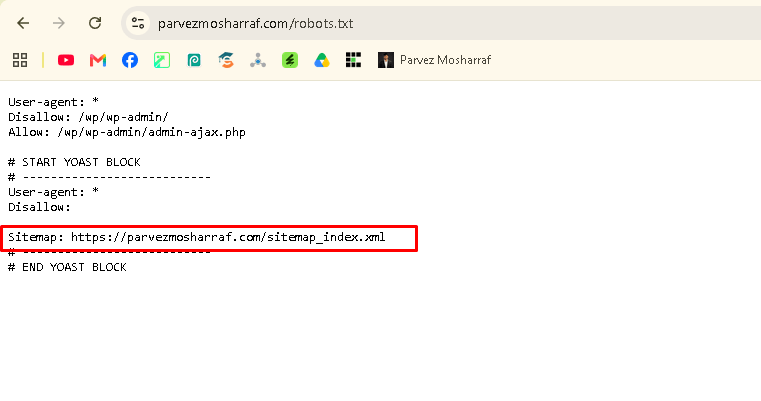
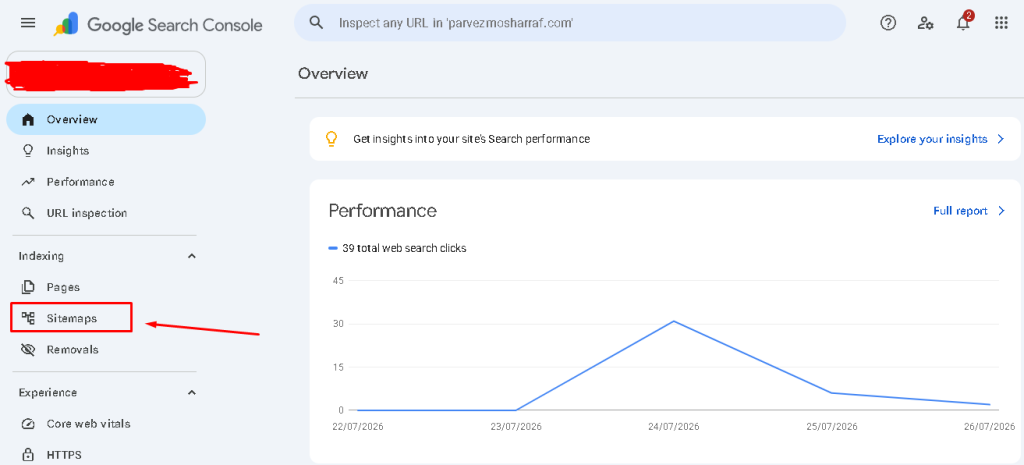
Add the sitemap inside Google Search Console.A sitemap helps search engines find important URLs.
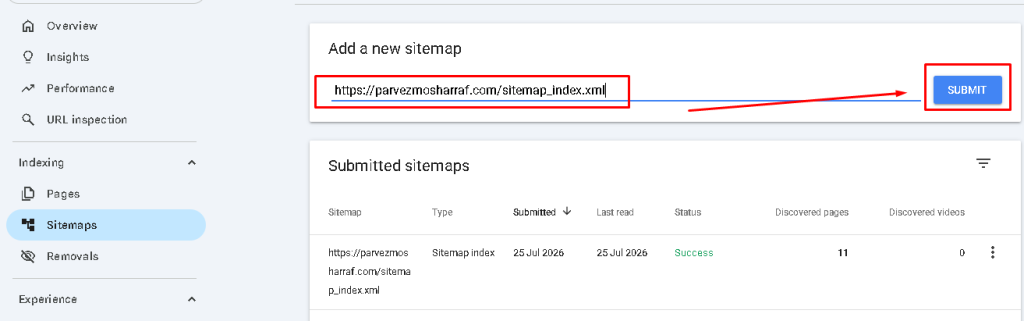
It does not guarantee indexing.
->Visual placement: Show the Sitemaps report inside Google Search Console.
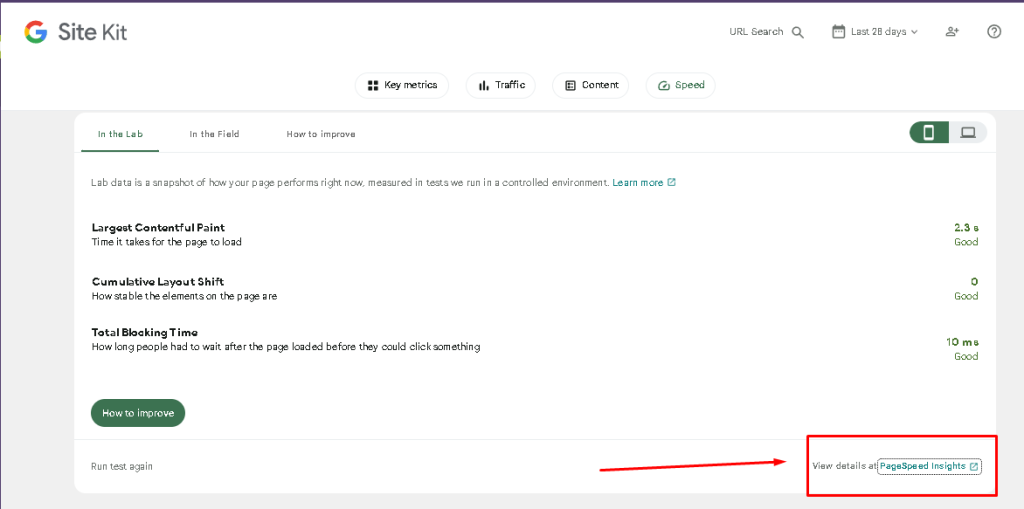
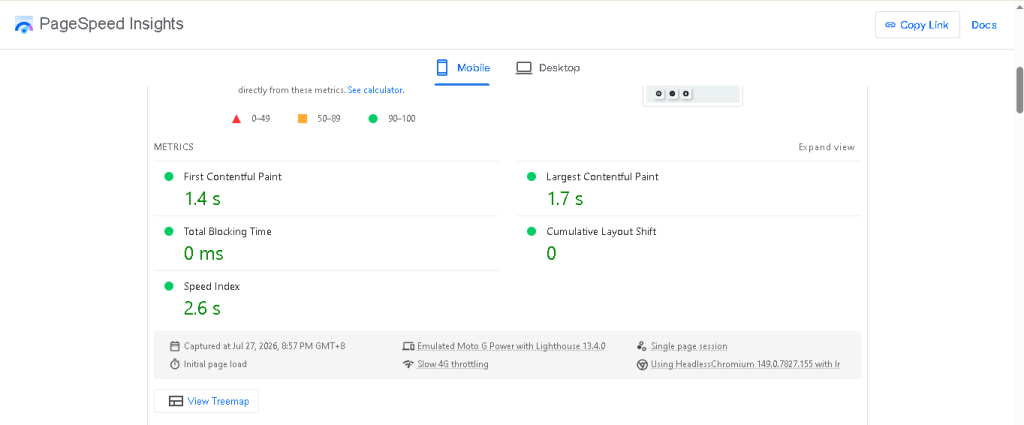
- Test important pages using PageSpeed Insights.
- Improve large images, heavy scripts, and slow hosting.
- Use a responsive theme.
- Keep buttons readable and easy to tap.
- Google recommends secure, fast, accessible, mobile-friendly websites.
- Technical improvements support visitors and search performance.
Step 13: Track Results and Improvement
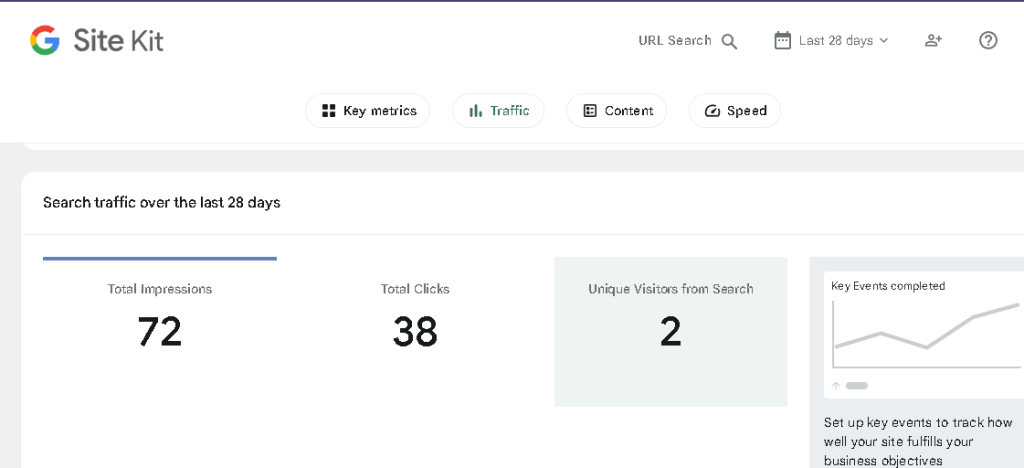
Connect your website with Google Search Console.
Monitor:
- Search clicks
- Impressions
- Average positions
- Indexed pages
- Crawl issues
- Search queries
- Click-through rates
- Do not judge results after two days.
- Some changes appear quickly.
- Others can take weeks or months.
- Review important pages monthly.
- Update weak sections when needed.
Common WordPress SEO Mistakes
- Beginners often make predictable mistakes.Installing Too Many Plugins.
- More plugins do not guarantee better rankings.Extra plugins can create conflicts and slow pages.
- Publishing Thin Content.A short page is not automatically weak.However, it must fully answer the search query.
Ignoring Search Intent
- A page can target the wrong keyword.
- Match the format, depth, and goal behind the query.
Changing URLs Carelessly
- Changing a published URL can break links.
- Use a 301 redirect when a permanent change is necessary.
Expecting Instant Rankings
- WordPress SEO is a long-term process.
- Consistent improvements usually beat random bursts of optimization.
Quick WordPress SEO Checklist
Before publishing, confirm these items:
- The page targets one clear search intent.
- The title explains the page accurately.
- The URL is short and descriptive.
- The introduction answers the main question.
- Headings follow a logical order.
- Images are compressed and relevant.
- Alt text describes each useful image.
- Internal links support deeper reading.
- The meta description encourages clicks.
- The page works well on mobile.
- The content includes original value.
Search engines can index the page.
Frequently Asked Questions
What is WordPress SEO in simple words?
WordPress SEO is the practice of improving a WordPress site’s search visibility.
It includes content, speed, links, URLs, and technical settings.
Is WordPress good for SEO?
Yes,WordPress provides useful publishing and permalink features.
Your theme, hosting, content, and settings still affect results.
Do I need an SEO plugin for WordPress?
A plugin is not mandatory.
However, it makes titles, sitemaps, canonicals, and indexing controls easier to manage.
How long does WordPress SEO take?
Some changes can appear within days.Meaningful growth often requires several weeks or months.
Can I do WordPress SEO myself?
Yes,Beginners can handle many essential tasks.Start with content, titles, links, speed, and Search Console.
-> Schema note:These questions use a clear question-and-answer structure.
FAQPage markup can mirror them. However, Google currently shows FAQ rich,results mainly for authoritative government and health websites.
Correct markup never .
guarantees a rich result.
Conclusion and Next Steps
- WordPress SEO becomes easier when you follow a simple system.
- Start with indexing, permalinks, and one reliable plugin.
- Then improve content, links, images, and speed.
- Do not chase every new trick.
- Create useful pages for real people.
- Measure performance.
- Improve what already exists.
Your next step is simple.Choose one important page today.Review it using the checklist above.
Then share your biggest optimization challenge in the comments.
Ready to Grow Your WordPress Traffic?
Fix its title, content, links, images, and speed.
Small improvements can create meaningful long-term growth.
Start optimizing today, publish with confidence, and turn search visibility into real business results.
Leave a Reply